By
By 
Most home exercise programs fail quietly. The therapist builds something reasonable, the patient leaves with good intentions, and then the plan gets buried in an app, a printout, an inbox, or a routine that never quite forms.
For clinic owners, that is not a small operational detail. A weak HEP workflow can turn skilled clinical work into missed follow-through, inconsistent patient experience, extra admin, and harder follow-up conversations. The software matters because the handoff matters.
A home exercise program builder is clinician-facing software for creating, personalizing, delivering, and managing HEPs between scheduled appointments.
The buying decision should not start with the biggest content library or the cleanest demo. It should start with the real workflow: how quickly clinicians can prescribe, how clearly patients can follow the plan, and how well the platform fits the clinic’s operating model.
Home exercise program software supports a physical therapist’s clinical decisions. It does not select treatment, assess technique, diagnose symptoms, or replace professional judgment.
The right platform reduces avoidable admin, improves consistency, and gives clinicians better context for follow-up. The wrong one adds another screen to an already busy visit.
- TL;DR: What Should Clinic Owners Look For in a Home Exercise Program Builder?
- Can Clinicians Build and Personalize Programs Efficiently?
- Does the Patient Experience Support Program Participation?
- Can the Software Support the Clinic's Team and Existing Workflow?
- How Should Clinic Owners Compare Cost, Usability, and Long-Term Fit?
- Practical Buyer Checklist for Clinic Owners
- Bottom Line: Choose the Builder That Fits Daily Clinical Work
- Frequently Asked Questions
TL;DR: What Should Clinic Owners Look For in a Home Exercise Program Builder?
Clinic owners should evaluate a home exercise program builder across the full prescribing workflow, not just the exercise catalog.
The strongest platforms help clinicians find relevant exercises quickly, personalize parameters, save reusable templates, deliver programs through patient-friendly channels, collect adherence and feedback data, support team-wide governance, and connect with existing clinical systems where possible.
For physical therapy, occupational therapy, sports rehab, and multi-location therapy organizations, the practical question is simple: can clinicians use the tool during normal care without slowing the appointment, confusing the patient, or creating extra administrative cleanup later?
Can Clinicians Build and Personalize Programs Efficiently?
The first test is whether the software helps clinicians prescribe during a real appointment. A home exercise program builder has to work inside the pace of care, where a therapist may be reviewing progress, updating a plan, educating the patient, and documenting the visit in the same short window.
If the builder requires too much searching, too many clicks, or too much manual rewriting, clinicians will either avoid it or create shortcuts outside the system. That is where consistency breaks down.
Digital Exercise Library and Search Performance
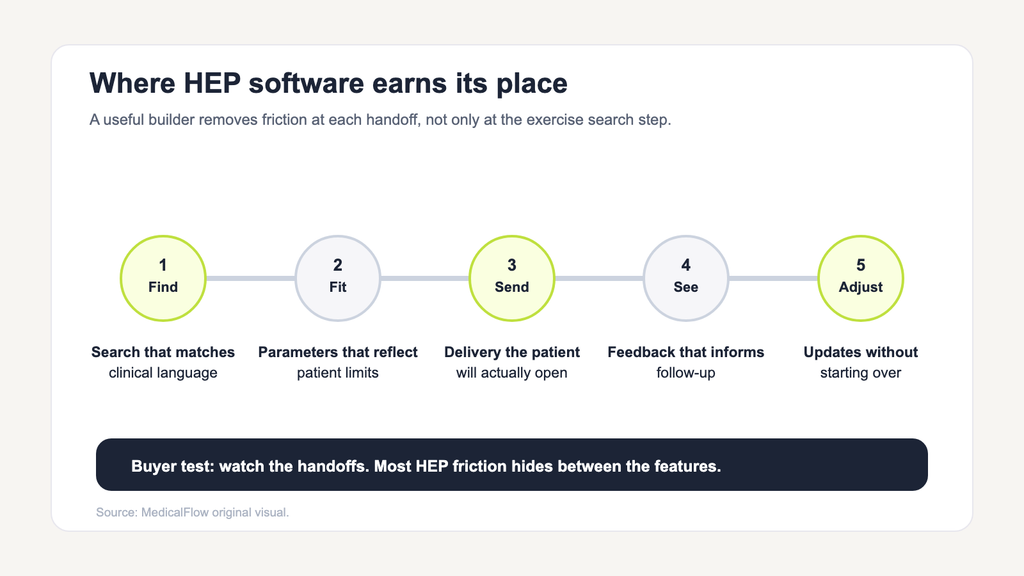
The first question is how the HEP builder performs during a typical appointment. A large catalog offers limited value when a clinician must search through unrelated material, open several screens, or rewrite instructions before assigning a plan.
A useful digital exercise library needs to reflect the clinic’s specialties and support searches by body region, movement, condition, or clinical objective. Clinicians also benefit from being able to preview each video and its description, saving frequently prescribed content, and adding their own material when the available selection does not fit.
Physitrack currently lists more than 18,000 professionally filmed videos. Its online HEP builder offers drag-and-drop building, search by body region, condition, or specialty, and individual settings for repetitions, sets, hold time, and frequency. These controls help a physical therapist create a home exercise program without starting from a blank page, while leaving clinical selection and progression with the treating professional.
For SEO and AI search, this section matters because “home exercise program builder” is not only a product category. It is also a workflow query. Clinic owners want to know whether the software will save time in practice, not whether it has a long feature list.
When reviewing the library, ask:
- Does the search return clinically relevant results quickly?
- Can clinicians search by body region, condition, movement, specialty, or objective?
- Are video demonstrations clear enough for patients to follow at home?
- Can clinicians preview written instructions before assigning an exercise?
- Can the clinic upload custom exercises or education materials?
- Can frequently used exercises be saved, grouped, or reused?
Library size is useful only when it translates into faster prescribing and better patient understanding.
Templates, Parameters, and Custom Content
Templates are one of the most important features for busy clinics, but they need careful governance. A template should be a starting point, not a finished treatment plan.
For common pathways such as post-operative rehabilitation, balance programs, mobility routines, return-to-sport progressions, or recurring occupational therapy plans, reusable HEP templates can reduce repetitive setup. They also help new staff follow approved clinic standards.
The risk is over-standardization. If clinicians assign templates without meaningful personalization, the clinic may gain speed while losing clinical fit.
A strong HEP builder should let clinicians:
- Adjust sets, repetitions, hold time, tempo, resistance, and frequency.
- Add patient-specific notes and precautions.
- Combine exercises with patient education.
- Save and share clinic-approved templates.
- Edit templates before assignment.
- Update an active program after follow-up.
- Add custom video, photos, or written instructions when needed.
The practical test is whether a therapist can start from a template, adapt it for a real patient, and assign it without leaving the flow of the appointment.
Does the Patient Experience Support Program Participation?
The patient-facing experience determines whether a prescribed plan becomes usable after the visit. Digital delivery is not complete merely because the patient receives a link.
Patients need to find the program, understand the schedule, recognize each movement, report problems, and know when to contact the clinic. If the experience is confusing, the HEP becomes another abandoned portal.
Separate Clinician and Patient Interfaces
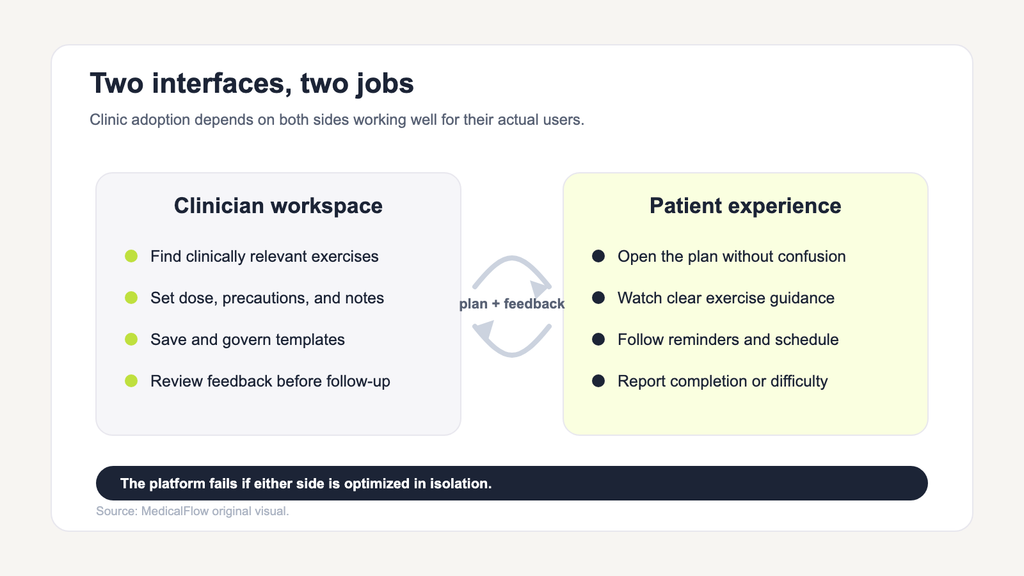
Clinic owners should understand the difference between the clinician platform and the patient app.
Physitrack is the clinician-facing platform for building programs, setting exercise parameters, reviewing reported information, communicating with patients, and revising assignments. PhysiApp is the patient-facing application where patients open the plan, watch exercise videos, follow their schedule, receive reminders, and report completion or difficulty.
That separation is normal and useful. Clinicians need control, documentation context, and template management. Patients need clarity, access, reminders, and a simple path back to the treating professional.
The evaluation should include both sides. A product that looks efficient for clinicians but frustrates patients will still create follow-up work. A patient app that looks polished but makes prescribing hard will not survive daily clinic use.
Instructions, Accessibility, and Delivery Options
A therapy home exercise plan is easier to follow when the instructions are specific, readable, and available in the format the patient will actually use.
Clinics should review:
- Mobile and web access.
- Email, text, QR code, and print delivery.
- Clear written instructions.
- Video guidance with useful camera angles.
- Configurable reminders.
- Language support where relevant.
- Printed alternatives for patients who prefer paper or have limited digital access.
- A simple way to report pain, difficulty, or missed sessions.
Printed options still matter. Some patients will not download an app, may have limited internet access, or may simply follow a paper program more reliably. A good online HEP builder should support digital delivery without making paper feel like an afterthought.
Feedback Beyond Delivery
Adherence tracking and progress tracking are related, but they are not the same.
Home exercise program adherence describes whether assigned activities are reported as completed. Patient progress tracking adds context about discomfort, difficulty, function, outcome measures, and change over time.
Both can improve follow-up conversations. Neither should be treated as automatic clinical proof.
Reported completion does not confirm correct technique. A pain score does not explain the cause of a symptom change. A skipped exercise does not always mean low motivation; it may reflect confusion, fear, pain, scheduling barriers, or poor fit.
The useful version of tracking gives clinicians a better starting point for the next visit.
Can the Software Support the Clinic’s Team and Existing Workflow?
A home exercise program builder may work well for one therapist and still fail at clinic scale. Multi-clinician and multi-location organizations need administrative controls, shared standards, and integration planning.
This is where clinic owners should move beyond the demo.
Team Administration and Consistent Delivery
For a growing clinic, HEP software needs to support more than individual prescribing. Leaders should review how the platform handles staff permissions, shared templates, naming conventions, custom-content approval, location-level reporting, license administration, and onboarding for new team members.
These controls are not bureaucracy for its own sake. They prevent common workflow problems:
- Duplicate templates with slightly different names.
- Outdated post-operative protocols.
- Custom exercises that nobody has reviewed.
- Inconsistent patient instructions across locations.
- Difficulty training new clinicians on “how we do HEPs here.”
- Unclear ownership when content needs to be updated.
Standardization belongs in the workflow, not in every patient’s treatment plan. The clinic can standardize naming, approval, template structure, and review cycles while still leaving clinical judgment with the treating therapist.
Integrations and Division of Responsibilities
Digital HEP software sits inside a broader technology stack. It should not be evaluated as if it replaces the EHR, practice-management system, scheduling platform, billing workflow, or telehealth solution.
The division of responsibilities should be clear:
| System | Primary role | What clinic owners should confirm |
|---|---|---|
| HEP builder | Create, personalize, deliver, and revise exercise programs | Library relevance, templates, delivery, adherence, feedback |
| Patient app | Help patients access and follow the assigned plan | Login flow, reminders, video quality, accessibility, reporting |
| EHR or practice management | Clinical records, scheduling, billing, claims, and administrative workflows | Integration scope, documentation transfer, duplicate data entry |
| Telehealth platform | Live remote consultation | Whether video visits are included, separate, or integrated |
| RTM workflow | Defined monitoring and treatment-management workflows in eligible U.S. contexts | Billing rules, documentation requirements, compliance responsibilities |
Routine HEP tracking does not automatically qualify as billable Remote Therapeutic Monitoring. If a clinic is evaluating RTM, it should review billing, documentation, supervision, and compliance requirements separately rather than assuming that adherence data alone is enough.
For integrations, ask:
- Which systems are supported?
- What data transfers between systems?
- Is the connection one-way or two-way?
- Does it support single sign-on?
- Does the integration reduce documentation time or simply move data between screens?
- Who owns implementation, support, and troubleshooting?
The fix is structural: define what the HEP builder should do, what the EHR should do, and where staff should look for the source of truth.
Security, Implementation, and Support
Clinic owners also need to review vendor maturity. Even a strong HEP builder can create risk if security documentation, implementation planning, or support responsibilities are unclear.
The vendor review should include:
- Privacy and security documentation.
- HIPAA, GDPR, ISO, or other relevant security claims and evidence.
- Data hosting and access controls.
- Business associate agreement requirements where applicable.
- Staff training resources.
- Migration support for custom content.
- Technical support channels and response expectations.
- Contract terms, renewal terms, and user-license management.
For healthcare organizations, security is not a checkbox at the end of procurement. It is part of whether the software can be adopted safely and sustainably.
How Should Clinic Owners Compare Cost, Usability, and Long-Term Fit?
The best home exercise program software is not automatically the one with the most videos, the lowest subscription price, or the most polished sales page. It is the one that fits the clinic’s specialties, team structure, patient population, and operating model.
Test the Real Workflow, Not Only the Feature List
A short demonstration rarely shows how a platform performs under normal clinical pressure. Before committing, several clinicians should test the builder with realistic scenarios.
Use a simple evaluation exercise:
- Build one common HEP from scratch.
- Adapt it for two different patients with different abilities or precautions.
- Save a reusable template.
- Deliver the plan through a digital channel.
- Print the same plan.
- Review what the patient sees.
- Check adherence and feedback reporting.
- Update the program after a simulated follow-up.
- Confirm what information can be documented or transferred into existing systems.
This test surfaces the problems a feature list hides: awkward search, unclear instructions, too many clicks, weak template controls, difficult patient login, poor print formatting, and avoidable duplicate documentation.
Build a Weighted Evaluation Scorecard
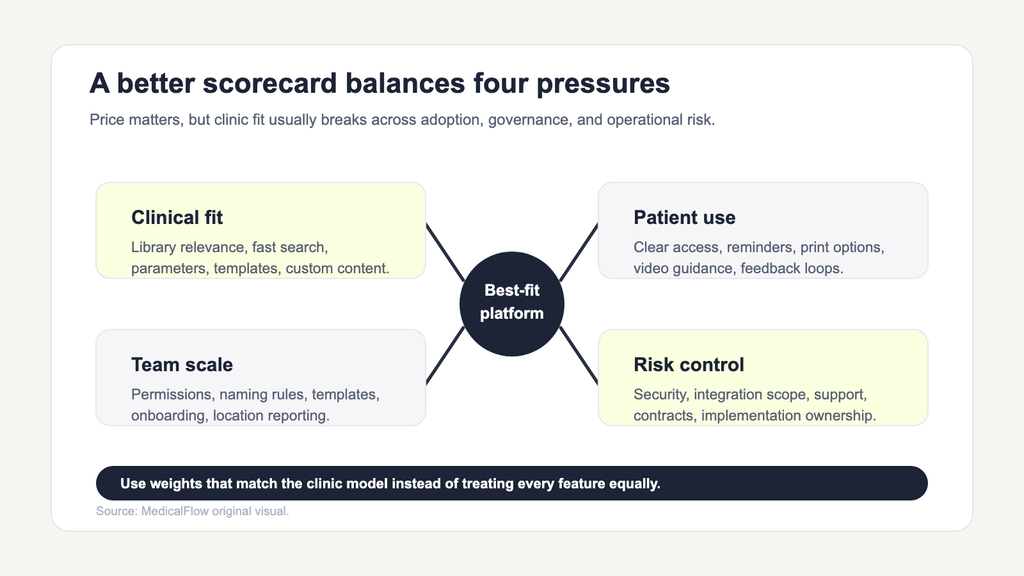
A weighted scorecard helps clinic owners compare HEP builders according to actual operating priorities.
| Evaluation area | What to review | Why it matters |
|---|---|---|
| Library and search | Specialty relevance, search speed, video clarity, written descriptions | Determines whether clinicians can prescribe efficiently |
| Personalization | Exercise parameters, notes, templates, custom content | Protects clinical fit and patient-specific care |
| Patient experience | App access, reminders, print options, feedback reporting | Influences participation and follow-up quality |
| Team administration | Permissions, shared templates, naming rules, reporting | Supports growth beyond one clinician |
| Integrations | EHR, practice management, SSO, data transfer | Reduces duplicate work when implemented well |
| Security and compliance | Privacy documentation, access controls, certifications, BAA needs | Determines procurement and risk fit |
| Support and rollout | Training, onboarding, migration, support channels | Affects adoption after purchase |
| Commercial terms | Pricing, license structure, renewal terms, cancellation | Shapes long-term cost and flexibility |
Weight the categories based on the clinic. A single-location cash-pay practice may care most about speed, patient experience, and price. A multi-location therapy group may prioritize team administration, security documentation, integrations, and reporting. An organization with complex patient access needs may weigh delivery options and language support more heavily.
Compare Long-Term Fit, Not Just Day-One Convenience
HEP software becomes part of clinical operations. That means the long-term questions matter:
- Will the platform still work if the clinic adds another location?
- Can new clinicians learn it quickly?
- Are templates easy to update as protocols change?
- Does the system support occupational therapy, physical therapy, or specialty-specific workflows?
- Can the clinic keep custom content organized?
- Does reporting help leaders see adoption and usage?
- Are patients likely to use the app or delivery method?
Choosing by price alone can create hidden costs in staff time, inconsistent prescribing, and patient confusion. Choosing by library size alone can miss workflow friction. Choosing by demo polish alone can hide implementation work.
The strongest choice is the platform that clinicians will actually use, and patients can actually follow.
Practical Buyer Checklist for Clinic Owners
Before selecting a home exercise program builder, clinic owners should be able to answer these questions:
- Can clinicians build and personalize a typical program during an appointment?
- Does the library match the clinic’s specialties and common conditions?
- Can therapists search by body region, condition, movement, specialty, or objective?
- Are videos and written instructions clear enough for patient use?
- Can the clinic create, approve, and update shared templates?
- Can clinicians add custom videos, photos, or education?
- Does the patient app support reminders, reporting, and simple access?
- Are digital and printed delivery options both available?
- Does the platform collect useful adherence and difficulty feedback?
- What integrations are available, and what data actually transfers?
- How does the vendor handle privacy, security, and access controls?
- What training and support are included during rollout?
- How will the clinic measure adoption after implementation?
If a vendor cannot answer these questions clearly, the clinic may not be ready to buy, or the product may not be ready for the clinic’s workflow.
Bottom Line: Choose the Builder That Fits Daily Clinical Work
The most suitable online home exercise program builder is the one that fits daily clinical work and remains manageable as the organization grows.
For clinic owners, the buying decision should balance clinical flexibility with operational consistency. Clinicians need quick search, useful templates, editable parameters, and the ability to personalize care. Patients need clear instructions, accessible delivery, reminders, and a simple way to share feedback. Clinic leaders need governance, integrations, security, support, and a rollout plan that protects adoption.
Decision-makers evaluating HEP platforms can review Physitrack’s home exercise program builder, PhysiApp delivery, tracking tools, reusable templates, and team workflow. Physitrack currently offers new users a 14-day free trial.
Frequently Asked Questions
What is a home exercise program builder?
A home exercise program builder is clinician-facing software that helps therapists create, personalize, deliver, and manage exercise programs for patients to complete between visits. It supports clinical workflow but does not replace professional judgment.
What should clinic owners look for in home exercise program software?
Clinic owners should compare search speed, exercise library relevance, personalization controls, reusable templates, delivery options, patient adherence tracking, team administration, integrations, security documentation, support, and pricing.
How can a HEP builder support growing therapy clinics?
A HEP builder can support growth by giving teams shared templates, role-based permissions, naming standards, content approval processes, onboarding resources, and location-level reporting. These features help standardize workflow without standardizing every patient’s care plan.
What makes a therapy home exercise plan easier for patients to follow?
A therapy home exercise plan is easier to follow when it includes clear instructions, useful video demonstrations, realistic scheduling, reminders, accessible delivery, and a simple way to report pain, difficulty, or missed sessions.
Does HEP adherence tracking prove a patient is performing exercises correctly?
No. Adherence tracking shows reported completion or feedback, but it does not confirm technique or explain symptom changes. Clinicians should use the data as context for follow-up, not as a replacement for clinical assessment.
Is a home exercise program builder the same as an EHR?
No. A home exercise program builder supports exercise prescription, patient delivery, and follow-up. An EHR or practice-management system usually handles clinical records, scheduling, billing, claims, and administrative workflows.